Isuzu MU-X in Tachwire: every model and generation
Isuzu MU-X: every model and generation
Every car gets what it gives: most cars from 2008 on (CAN) bring the standard readings, and many makes give more from their own units. Makes are added one by one, and we only call a reading working once we’ve seen it arrive in a real drive.
Model, body code, engine or year. We never ask for a VIN.
- Confirmed Every reading in green arrived in drive logs of this version.
- Engine already driven The engine has been driven with this profile in another model, not this version yet.
- No drives yet A profile is ready; the first drive will show which readings arrive.
- Standard readings only Revs, speed, coolant, intake air, throttle and engine load — if the car reports them.
Already driven with Tachwire
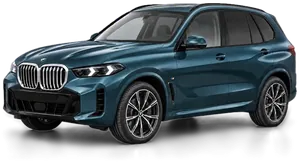 BMW X5 40iG05 · 2018–2026Blue Ridge Mountain · launch colour988 drives
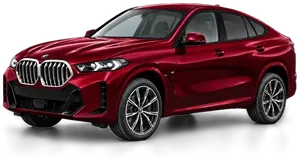 BMW X6 40iG06 · 2019–2026Isle of Man Green · launch colour413 drives
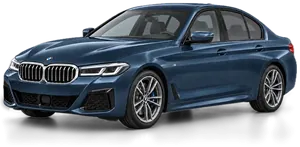 BMW 5 Series 530iG30 · 2016–2024Phytonic Blue · launch colour118 drives
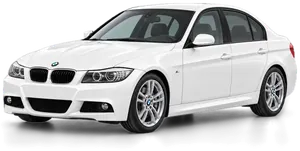 BMW 3 Series 335i (US)E90 · 2007–2012Alpine White113 drives
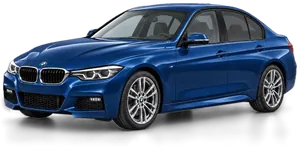 BMW 3 Series 316iF30 · 2012–2019Mediterranean Blue · launch colour96 drives
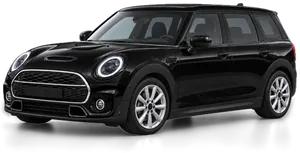 MINI Clubman John Cooper WorksF54 · 2015–2024Midnight Black88 drives
Or pick step by step
Already driven with Tachwire
BMW48 confirmed versionsAudi3 confirmed versionsFord1 confirmed versionsMazda1 confirmed versionsMINI2 confirmed versionsOpel1 confirmed versionsPorsche1 confirmed versionsŠkoda1 confirmed versionsProfiles ready, no drives yet
AcuraBentleyChryslerDodgeHondaHyundaiIsuzuJaguarJeepKiaLamborghiniLand RoverLexusMercedes-BenzRAMSEAT / CUPRAToyotaVolkswagenStandard readings only
AlpineRenaultAll models by make
Driven with Tachwire. Every reading under “Shows” was seen in a real drive log.
The app recognises the car and asks it for more than the standard set. Until a drive log shows a reading arriving, we don’t call it working.
The readings most cars from 2008 on (CAN) can give. What arrives depends on the car.
“Power and torque” under Shows is the engine unit’s own torque, and power as that torque × revs, read while driving — not a dyno figure; a tuned engine reads above the brochure.
How we check a car
Only by a real drive log: a drive over Bluetooth, on the move, of a car whose VIN names that model — never the simulator or the demo.
A reading counts once it has arrived in such a drive with plausible values. Until then the page says “asked for”, not “working”.
A make’s or a model’s profile stays a trial until its first drive log. New cars are proven by the logs drivers choose to send from the app.
Confirmed
No drives yet
Isuzu
No drives yet
The D-Max (2012 on) and MU-X (2013 on), recognised from the VIN down to the generation and engine. They get the standard readings, the diesel’s boost and rail pressure among them where the engine reports them. Factory CarPlay comes with the D-Max from 2020 and the MU-X from 2021; these generations also get a trial profile for the automatic gearbox, its oil temperature from the gearbox unit. The Mazda BT-50 from 2020, built by Isuzu, is read the same way.
D-Max RG, MU-X RJ
not yet seen in a drive
D-Max RT, MU-X RF
Standard OBD
Tachwire is an independent app, not affiliated with, endorsed or sponsored by any carmaker. BMW, MINI, Audi, Volkswagen, Škoda, SEAT, CUPRA, Mazda, Honda, Acura, Toyota, GR Supra, Lexus, Ford, Porsche, Mercedes-Benz, RAM, Dodge, Jeep, Chrysler, Renault, Dacia, Alpine, Land Rover, Jaguar, Isuzu, Lamborghini, Bentley, Kia, Hyundai, Chevrolet, GMC, Cadillac, Buick, Peugeot, Citroën, DS, Opel, Vauxhall and other make and model names are trademarks of their respective owners, used here only to say which cars the app works with. CarPlay and iPhone are trademarks of Apple Inc.; Dragy is a trademark of its owner.
You’ll need a Bluetooth LE adapter
An iPhone talks only to Bluetooth LE adapters, not to classic Bluetooth or Wi-Fi ones. Driven on: OBDLink CX (the fastest), vLinker MC+ / FS, vLinker BM+, vLinker FD+, UniCarScan UCSI-2100, Veepeak BLE, Vgate iCar Pro BLE 4.0, OBDII Snowman, Rokodil ScanX, DIYER.
All adapters we know ofDrive one of the cars with no drives yet?
Install Tachwire from the App Store, drive as usual and send the drive from More → Help the project. A drive usually shows us which readings arrive; this page changes once they do.
Where you drove isn’t sent: location is removed on the phone; only laps on a track keep their positions.
What will not work
BMW E-series and older: nothing from the car’s own units. At most the standard readings, and only where the OBD port speaks CAN, as on most E-series built from 2007.
MINI built before 2014, and the MINI generation from 2024.
Classic Bluetooth and Wi-Fi adapters, as above.
Cars without an OBD port, or whose port does not speak CAN: the app talks CAN only, and many cars built before 2008 do not.
Your car is here but something is missing? Send a drive from More → Help the project and write to support@tachwire.app with its code. That is how a reading gets confirmed.
How to send a drive